
Unifying every channel with OneSignal: email, push, in-app, SMS… and now WhatsApp
How we helped a medical SaaS unify their patient communications by bringing WhatsApp into OneSignal Journeys.

TL;DR
With this setup, you can run all your channels from one place in OneSignal: push, email, SMS, in-app, and now WhatsApp. Customers reply in natural language on WhatsApp, an AI agent understands them, and the result (confirmed, declined, not_sure) gets synced back into OneSignal tags. That way your Journeys stay unified and consistent across every touchpoint.
Why we built this
At Bildung (OneSignal’s top partner in LatAm), we worked with a client, a SaaS for medical practices, that faced two big challenges:
WhatsApp was siloed.
They managed push, in-app, and email in OneSignal… but WhatsApp ran in parallel, totally disconnected. That meant duplicated logic, inconsistent user states, and no way to run an omnichannel journey.A static WhatsApp bot that failed real patients.
Their bot only offered rigid options (“Reply A to confirm, B to reschedule, C to cancel”). But patients wrote in natural language: “Hey, I might not make it tomorrow, could I come later?”. Those replies broke the flow and got lost, leaving the clinic blind.
The goal: bring WhatsApp into OneSignal Journeys, powered by AI, so patients could reply naturally, the system would understand, and OneSignal would remain the single source of truth.
Architecture at a glance
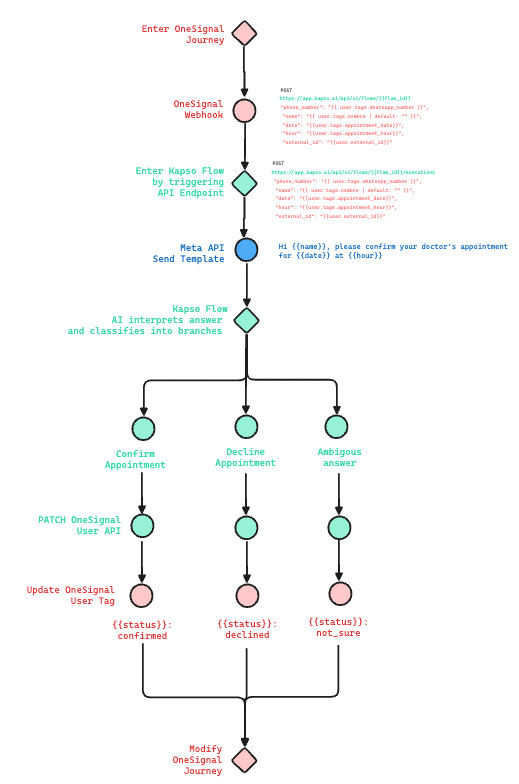
OneSignal Journey orchestrates all your channels (push, email, SMS, in-app… and now WhatsApp)
Webhook step → POST to Kapso
Kapso Flow starts with the payload (phone, name, date, hour, external_id)
WhatsApp Template (created & approved inside Kapso) is sent via Meta API
User replies on WhatsApp (free text) → Kapso AI classifies reply
Kapso → OneSignal User API (PATCH) updates
appointment_statusOneSignal Journey branches on that tag and continues
Step 1 — Start with a OneSignal Journey
Everything begins inside OneSignal Journeys, where you orchestrate all your channels from a single place: push notifications, email, SMS, in-app messages… and now WhatsApp too.
From there, you simply add a Webhook step that POSTs to Kapso, sending along the user data (phone, name, date, hour, external_id) to kick off the WhatsApp flow.
POST https://app.kapso.ai/api/v1/flows/{{FLOW_ID}}/executions
Authorization: Bearer {{KAPSO_API_KEY}}
Content-Type: application/json
{
  “phone_number”: “{{ user.tags.phone_number }}”,
  “name”: “{{ user.tags.name | default: “” }}”,
  “date”: “{{ user.tags.appointment_date }}”,
  “hour”: “{{ user.tags.appointment_hour }}”,
  “external_id”: “{{ user.external_id }}”
}
Step 2 — WhatsApp Template inside Kapso
Kapso makes this step simple: you can create and manage WhatsApp templates directly in Kapso, send them for Meta approval, and then use them in your flows without coding JSON.
For example, a template could be:
“Hi {{name}}, please confirm your doctor’s appointment for {{date}} at {{hour}}.”
When the webhook fires, the template is sent with the right variables.
Step 3 — AI classification of replies
Kapso’s AI agent reads the free-text response and classifies it into branches:
“Yes, confirmed” →
confirmed“I can’t tomorrow” →
declined“Mmm I should check my agenda?” →
not_sure
This is the big shift: no more static options. Patients type naturally, the AI interprets, and the flow continues.
Step 4 — PATCH back to OneSignal
Once Kapso knows the outcome, it calls OneSignal’s Users API to update the user tag:
PATCH https://api.onesignal.com/apps/{{ONESIGNAL_APP_ID}}/users/by/external_id/{{ external_id }}
Authorization: Bearer {{ONESIGNAL_REST_API_KEY}}
Content-Type: application/json
{
  “tags”: {
    “appointment_status”: “{{ branch_label }}”
  }
}
Because we sent external_id in the first webhook, we can deterministically update the right profile in OneSignal.
Step 5 — Continue the Journey in OneSignal
Now the tag appointment_status is available:
If confirmed → stop reminders, send prep info.
If declined → trigger a reschedule journey.
If not_sure → escalate or offer a reschedule link.
And because everything lives in OneSignal, you can experiment with channels—WhatsApp, push, email, SMS, in-app—without duplicating logic.
Outcome for the client
For the medical SaaS:
Unified orchestration: WhatsApp is now just another channel in their OneSignal Journeys.
Smarter conversations: Free-text patient replies are understood and acted on.
Single source of truth: Appointment status lives in OneSignal, not scattered.
The result: higher confirmation rates, fewer missed appointments, smoother rescheduling, and less manual work for clinic staff.
Why this matters
This project shows what’s possible when you stop treating WhatsApp as an isolated bot and start treating it as part of a unified journey.
At Bildung, our mission as OneSignal’s reseller in LatAm is to help companies design data-driven, omnichannel engagement strategies. Integrations like this are how you unlock the full power of your stack: all your channels, all your touchpoints, one journey.